Emote Pack Griffon: Expressive Icons for Digital Communication
In the landscape of digital interaction, the ability to convey tone and emotion quickly is often the difference between a clear message and a misunderstood one. For professionals managing remote teams, creators building community engagement, or educators facilitating online learning, visual cues are indispensable. The Emote Pack Griffon addresses this need by providing a curated set of expressive icons designed to bridge the gap between text-based communication and human nuance. Rather than relying on generic, overused emojis that may not fit a specific brand voice or professional context, this pack offers a distinct aesthetic tailored for clarity and versatility.
The value of a specialized asset like the Emote Pack Griffon lies in its consistency and precision. When you integrate these visuals into your workflow, you are not just adding decoration; you are enhancing the efficiency of your communication. Whether you are designing a user interface, creating a presentation deck, or moderating a chat channel, having a reliable set of expressions at your disposal allows you to react instantly without breaking your creative flow. This article explores how this specific collection of eight emotes can support your goals, who benefits most from using them, and the practical steps to access the files.
Understanding the Core Collection
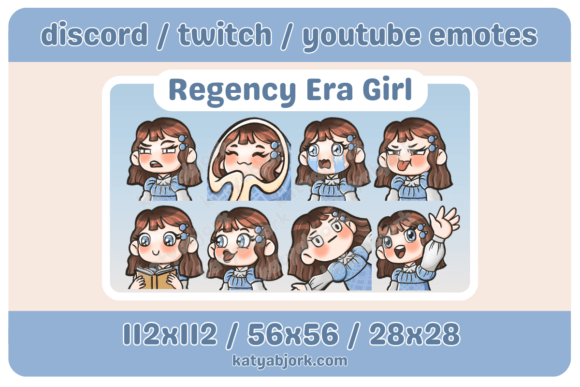
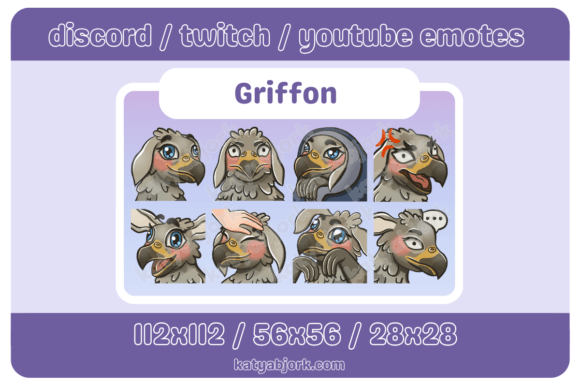
The Emote Pack Griffon is built around a foundational set of eight distinct emotional states. Each icon has been carefully crafted to represent a specific sentiment clearly, avoiding ambiguity. The collection includes Smiling, Comfy, Angry, Cute, Excited, Mildly Irritated, Pat, and Thinking. These choices were not random; they cover the spectrum of daily interactions found in both professional and casual environments.
Consider the utility of the "Mildly Irritated" or "Thinking" emotes. In a corporate setting, typing out "I am currently reviewing this data" or "I have some concerns about this timeline" can feel heavy or overly formal. A single, well-designed icon can convey the same status update with less cognitive load for the reader. Similarly, the "Comfy" and "Cute" options provide a softer touch for community management or customer support, helping to de-escalate tension or build rapport without sounding unprofessional.
What sets this pack apart is the attention to scalability. Every emote is provided in three specific sizes: 28x28, 56x56, and 112x112 pixels. This range is critical for modern design workflows. The 28x28 version is ideal for compact chat interfaces, sidebars, or mobile notifications where space is premium. The 56x56 size serves as a standard medium for avatars, reaction buttons, or inline content. Finally, the 112x112 resolution ensures crisp detail when used in larger contexts, such as presentation slides, social media graphics, or hero images on a website. By including these variations, the pack eliminates the need for users to resize images manually, which often leads to pixelation or blurring.
Practical Applications for Professionals and Creators
For freelancers and small business owners, time is a finite resource. The Emote Pack Griffon supports efficiency by streamlining the visual aspect of communication. Instead of searching through stock photo libraries or struggling to create custom graphics for every client update, you can deploy these pre-sized assets immediately. Imagine a project manager updating a team dashboard; using the "Excited" icon next to a milestone completion or the "Thinking" icon next to a pending decision creates a visual rhythm that makes complex information easier to scan.
Content creators and bloggers also benefit significantly from consistent branding. Generic emojis can clash with a site's color palette or design language. The Griffon pack offers a cohesive style that can be integrated directly into articles, newsletters, or video overlays. For instance, an educator creating an interactive course might use the "Pat" emote to encourage students after a difficult lesson, or the "Angry" icon to highlight common pitfalls to avoid. This specificity strengthens the connection between the creator and the audience, making the content feel more personal and responsive.
Marketers and entrepreneurs often struggle to maintain a human voice across automated channels. Integrating these emotes into email campaigns or social media posts can add a layer of warmth that automated text lacks. The "Smiling" and "Cute" variants are particularly effective for positive reinforcement, while "Mildly Irritated" can be used strategically in humorous or relatable marketing copy to acknowledge shared frustrations. However, it is important to consider the context; these tools should enhance your message, not distract from it. Users should compare their current visual assets against this pack to ensure the style aligns with their overall brand identity before committing to a full rollout.
Technical Access and File Management
One of the most common hurdles for non-technical users is accessing digital assets after purchase or download. The Emote Pack Griffon is delivered as a compressed archive to ensure fast transfer speeds and file integrity. To utilize the included PNG files, you must first extract the contents of the downloaded .zip file. This process requires a standard decompression tool.
If you are working on a Windows system, you will likely need third-party software such as WinRar or 7Zip, as the default operating system tools may not always handle all archive formats seamlessly. On macOS, the built-in Archive Utility usually suffices, but installing 7Zip for Mac provides additional compatibility if issues arise. Once you have the appropriate software installed, simply locate the downloaded file, right-click, and select the extraction option. This will reveal a folder containing the organized PNG files.
Inside the extracted folder, you will find the eight emotes sorted by their respective sizes (28x28, 56x56, 112x112). This organization is intentional, allowing you to drag and drop the exact file you need into your project without resizing. It is recommended to keep a backup of the original zip file in a secure location. While the PNG format is widely supported across web browsers, graphic design software, and presentation tools, maintaining the source archive ensures you can re-extract the files if they are ever accidentally deleted or corrupted during editing.
Evaluating Fit and Limitations
While the Emote Pack Griffon offers significant advantages, it is essential to recognize its scope. This pack is a focused collection of eight specific emotions. It is not a comprehensive library covering every possible facial expression or scenario. If your project requires highly niche or hyper-specific reactions, you may need to supplement this pack with other resources. Additionally, because the designs are static PNG images, they do not support animation. If your platform relies heavily on GIFs or Lottie animations for engagement, these static files serve a different purpose—primarily for UI elements, static graphics, or low-bandwidth environments.
Furthermore, the aesthetic of the Griffon pack is designed to be versatile, but "versatile" does not mean "universal." Before integrating these into a high-stakes corporate environment or a deeply stylized artistic project, preview them in your actual layout. Ensure the line weight and color contrast work well against your background colors. The "Angry" or "Mildly Irritated" icons, for example, carry strong emotional weight; using them inappropriately could send the wrong signal to a client or audience member. Contextual awareness remains the user's responsibility.
Conclusion on Strategic Value
The Emote Pack Griffon represents a practical solution for those looking to elevate their digital communication without investing hours in custom illustration. By providing eight key emotional states in three optimized sizes, it removes technical friction and allows you to focus on the message itself. Whether you are a freelancer closing a deal, a teacher engaging a class, or a marketer crafting a campaign, the ability to express tone visually is a powerful asset. With the simple step of unzipping the file using WinRar or 7Zip, you gain immediate access to a toolkit that can make your interactions clearer, warmer, and more efficient. In a world dominated by text, these small visual cues can make a disproportionately large impact on how your ideas are received and understood.